
 Enlarge
Twenty thousand lines, and then what
You sit down at a machine that "freezes now and then". Event Viewer holds twenty thousand records, a thousand of them red, and nine hundred of those are the same line over and over. Digging out what matters eats half an hour.
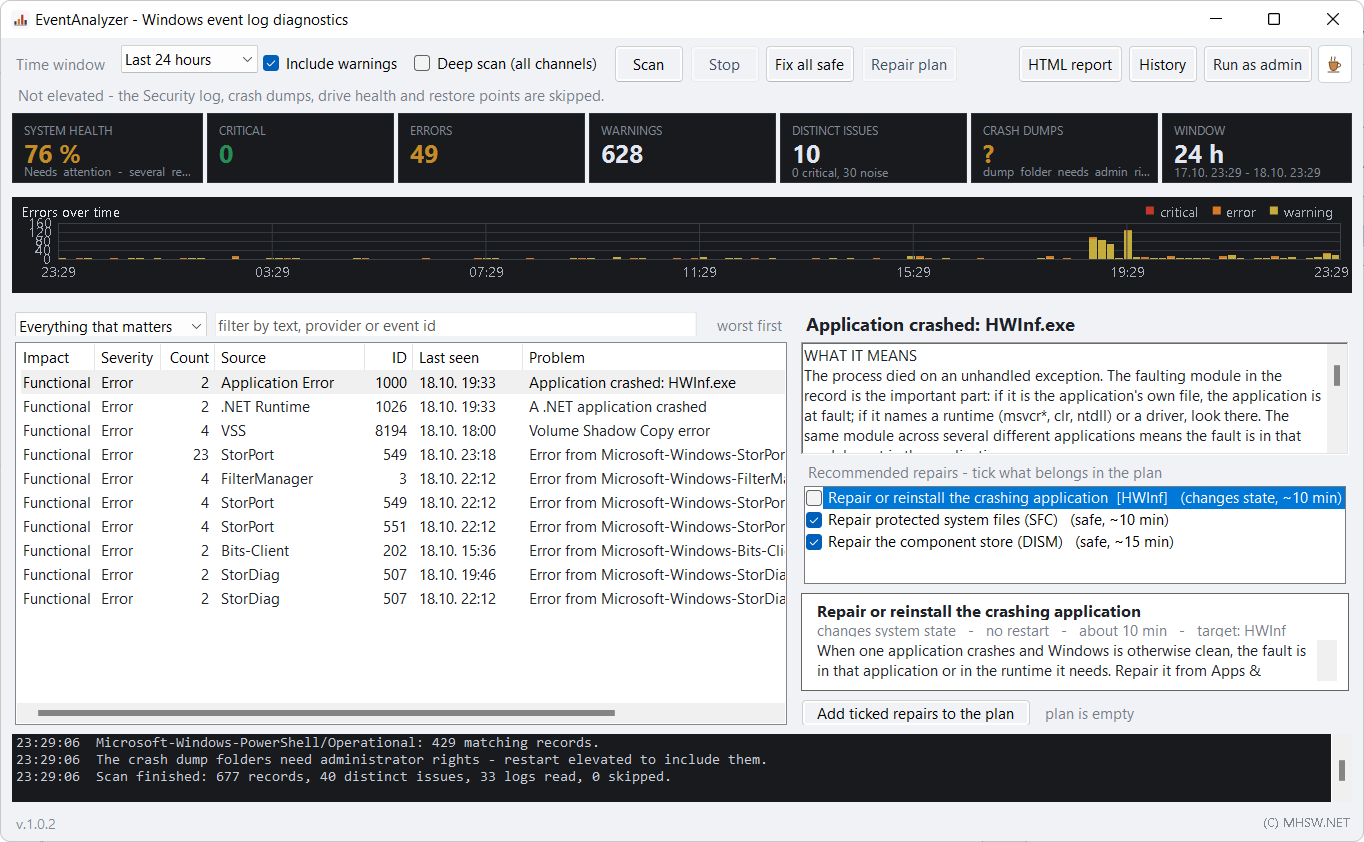
EventAnalyzer scans in a few seconds and hands back a list of findings ordered by what actually threatens the machine. Every finding comes with an explanation, how many times it happened, when it last occurred and what can be done about it.
Everything sits in one EventAnalyzer.exe, with no installer. Reading the logs does not need administrator rights — it asks for them only when they are genuinely required.
What’s new · v1.0.2
- The "what happened before it" section never filled, because the correlation ran over an empty list - it works now, in the window and in the report.
- Service repairs received the display name instead of the service name and failed; they now find the service by either.
- chkdsk /F /R on the system volume hung on a Y/N question in a hidden window; it is now scheduled for the next restart the way chkdsk itself does it. Other volumes are dismounted and repaired at once.
- The Windows Update reset never renamed the cache (cmd commands ran under PowerShell); it now renames with a time stamp, so it works on repeated runs too.
- Restore point: Windows allows one per 24 hours and silently skips the rest; the app lifts that limit for its own point and records in the history whether the point was really made.
- Without administrator rights the tiles and the report admit that the crash dump folder and the restore points could not be read, instead of "0 dumps" and "no restore points".
- Security log: audit records are labelled audit failure/success correctly, and a locked-out account (4740) and a cleared audit log (1102) are read.
- The DNS 1014 rule never matched because of the provider name; fixed.
- Grouping: DCOM 10016 splits by CLSID, service crashes no longer split by their crash counter, application crashes group by faulting module.
- DCOM: the scripts read the real APPID from the CLSID key; the application repair reads the Uninstall keys instead of Win32_Product.
- Repair history: the verification is recomputed by every later scan that reaches back to the repair and says how long after it was written. The plan is cleared once it has run.
- SFC output no longer has spaces between letters, decoded error codes are in English, the 32-bit dump header is read correctly, one crash with two dumps counts once.
- The inventory lists only automatic services that failed with an error, not the ones that stop on purpose.
- The .bat export runs each PowerShell step as one block, so variables carry between lines.
- The plan and history dialogs scale with DPI; --days with a non-numeric value returns exit code 2.
How it reads the logs
| Aspect | How it works |
|---|---|
| Scope | System, Application, Security, Setup and dozens of other channels — from the file system through disks and drivers to Windows Update and user profiles. An optional deep scan walks every enabled channel. |
| Period | 6 hours, 24 hours, 3, 7 or 30 days, or since the last boot. |
| Merging | A thousand identical errors become one finding with an occurrence count. Variable parts such as block addresses or instance numbers are ignored when comparing, otherwise one fault would shatter into hundreds of findings. |
| Correlation | For crashes, unexpected restarts and blue screens, everything from the preceding ten minutes is collected. That is usually where the disk error five seconds before the crash shows up. |
| Disks | System device names are translated into an actual disk: number, model, capacity, type and bus, volume letters and serial number. A disk that has been removed from the machine is labelled as such and no longer counts towards the score. |
| Memory dumps | Minidumps are read and the stop code and its parameters are extracted. |
Explanations instead of codes
Every common error has a rule that turns it into a sentence that makes sense — and where no rule exists, it is at least read generically by severity. Nothing is thrown away.
Status and stop codes are decoded, so instead of 0x80073712 you see what went wrong.
Findings are grouped by impact, not merely by severity:
- Critical — the system is unstable: crashes, power loss, disk errors, hardware faults.
- Functional — one specific thing is broken: a service keeps dying, an update will not install, the printer stays silent.
- Noise — errors Windows logs constantly that mean nothing. They do not disappear, but they stop dominating the summary and only count towards the score once they become excessive.
It all adds up to a health score of 0–100 %. Repetitions are scaled logarithmically and the period is normalised, so a month of history does not look more dramatic than a single day.
Proposed fixes
For each finding the program picks fixes from a catalogue of around thirty procedures — from system file and disk checks through service recovery, Windows Update and network stack resets, to memory testing and dump configuration. Every fix states its purpose, the exact script, the level of risk, whether a restart is needed, an estimate of the time and how to verify the result.
- You see the plan before anything happens — the steps, the reasons and the full script, which you can edit.
- A restore point is the first step of every plan. You can untick it, but you can see that it is missing.
- Running it from the app is not required. The plan exports as
.ps1or.bat, or goes to the clipboard to be run elsewhere. - After a fix the scan repeats and is compared with the previous one: how many findings are gone and how the score moved.
- Scripts and their output are kept, so there is a record of what was done to the machine.
Fixes change the system
Procedures such as a disk check, a Windows Update reset or a change to component settings alter the state of the machine. Always read the plan through, and on someone else's computer leave the restore point enabled. The program never runs anything on its own.
Report and batch mode
Save report… writes a self-contained HTML file: the verdict, summary tiles, a timeline of error occurrences, the individual findings with their commands, memory dumps, the chain of events before a crash, a recommended order of work, a machine inventory and the history of fixes applied. It opens offline and travels as a single attachment. A plain-text variant is there for the helpdesk.
Without opening the window:
EventAnalyzer.exe --report C:\out\pc01.html --days 7
The exit code is 0 for a healthy machine and 1 for an unhealthy one, which makes it straightforward to run from a logon script or a monitoring system (RMM) and collect results from every machine at once.
Requirements
- Windows 10 or Windows 11 (64-bit).
- .NET Framework 4.8 — part of Windows 10 since version 1903 and of Windows 11, so there is nothing to install.
- Without administrator rights the security log and some disk health values are skipped; the program says so and carries on.
- The interface is in English. The event texts themselves arrive in the language of Windows, so on a Czech system you will see Czech messages — merging and the rules work from identifiers rather than text, so nothing is affected.