
 Enlarge
What it does
A service classic: the customer is buying a new laptop or phone and does not know the password to their own Wi-Fi. The router has a different one, the note is long gone — and yet the old computer connects on its own. So the password is in there; Windows just will not show it except through the command line, one network at a time.
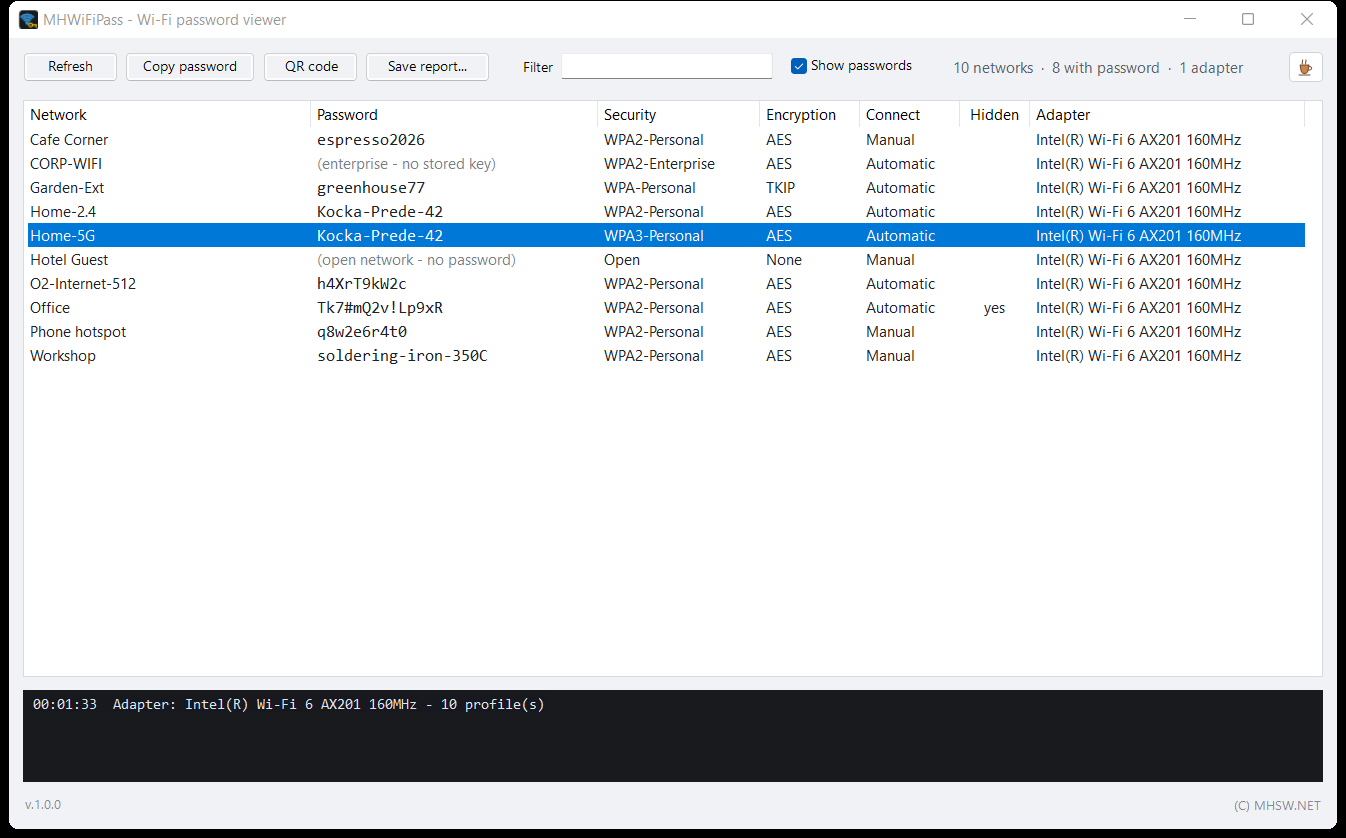
MHWiFiPass lists every saved network at once: name, password, security type, encryption, whether it connects automatically, whether it is hidden and which adapter it belongs to. Copy the password with a double-click, or hand it straight to a phone through a QR code.
It is one MHWiFiPass.exe: no installer, nothing written to the registry, nothing stored, and it fits on a USB drive next to your other service tools.
What’s new · v1.0.1
- When it starts, it asks www.mhsw.net once for a newer version; it sends only the program name, its version and the Windows build number
- A newer version shows in the bottom left corner as a link to the program's page; nothing is downloaded or installed
- The check can be turned off in the F1 help (the Updates block)
- A help taller than the screen scrolls, so the Close button no longer ends up below the edge
What the list shows
| Column | What it means |
|---|---|
| Network | The network name (SSID). When the Windows profile is named differently, its name follows in brackets. |
| Password | The password in a monospace font, so l, 1, I and O, 0 can be told apart. For a network without one, the reason why. |
| Security | WPA2-Personal, WPA3-Personal, WPA2-Enterprise, Open and the rest, in plain words instead of Windows' internal names. |
| Encryption | AES, TKIP, WEP or none. Old TKIP and WEP give away a network that is due for a new setup. |
| Connect | Whether the computer joins the network on its own (Automatic) or only when clicked (Manual). |
| Hidden | A network that does not broadcast its name and never shows in the network list. |
| Adapter | The Wi-Fi adapter the profile is saved for. A computer with two adapters keeps networks for each separately. |
A double-click, Ctrl+C or the Copy password button copies the password; the right-click menu copies the network name or both at once. The Filter box narrows the list by name, adapter or security, and a click on a column header sorts by it.
A QR code for the phone
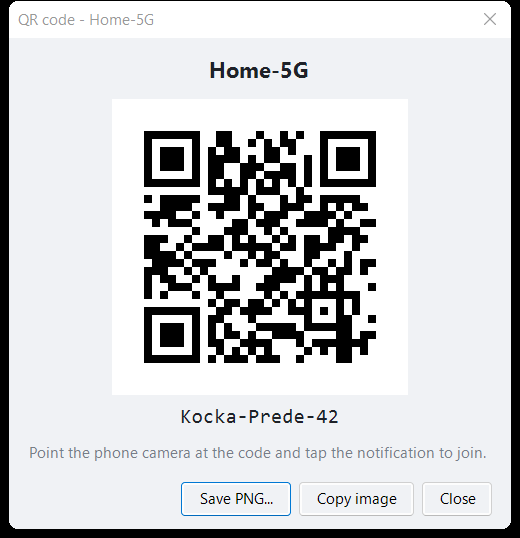
Nobody enjoys typing twenty characters like Tk7#mQ2v!Lp9xR into a phone. The QR code button shows the code of the selected network; the camera on Android and iPhone reads it and offers to join. One tap does it.
The code saves as a PNG picture or copies to the clipboard, ready for an e-mail or a document for the customer. For phones that cannot scan, the password is written under the code.
 Enlarge
A report for the customer
- Save report… — a self-contained HTML file: a summary, a table of every network with its password, and QR cards ready to print and stick on the fridge. No external files, opens without internet.
- The top of the report warns that it contains passwords in plain text. It belongs to the owner of the networks, not on a shared drive.
- With Show passwords turned off, the passwords are masked on screen and in the report, and the QR cards are left out. Handy when someone else is looking at the screen too.
Why it asks for administrator rights
Windows keeps Wi-Fi passwords encrypted and releases them in clear text only to a program running as administrator, so MHWiFiPass asks for the rights right at start. It cracks nothing and guesses nothing: it asks the Windows WLAN service for the same thing netsh wlan show profile key=clear shows, only for all networks at once.
Only on your own computer or one entrusted to you. The program shows the passwords already saved in this Windows and nothing else. Without administrator rights on that computer it cannot get to them.
Corporate networks (WPA2-Enterprise, 802.1X) keep no password in the profile; users sign in with a name and password or a certificate. They read enterprise — no stored key instead, and no QR code can be made.
Profiles of a removed adapter are not returned by Windows. Networks saved for a Wi-Fi card that is no longer in the computer are missing from the list.
Keys
| Key | What it does |
|---|---|
Ctrl+C | Copies the password of the selected network. |
Ctrl+S | Saves the report. |
F5 | Reads the networks again. |
F1 | Short help. |
Update check
When it starts, MHWiFiPass asks www.mhsw.net once whether a newer version exists. The request carries only the program name, its version and the Windows build number, nothing about you, your files or your computer. The server keeps a count of these checks, not of who made them. Nothing is downloaded or installed: a newer version only shows up in the bottom left corner as a link to this page. A box in the help (F1) turns it off, and then nothing is sent.
Requirements
- Windows 10 or Windows 11.
- .NET Framework 4.8. Windows 10 (since 1903) and Windows 11 already have it.
- An administrator account. The program asks for the rights itself at start.
- A Wi-Fi adapter and the WLAN AutoConfig service running. On a desktop without Wi-Fi the program simply says it found no adapter.