

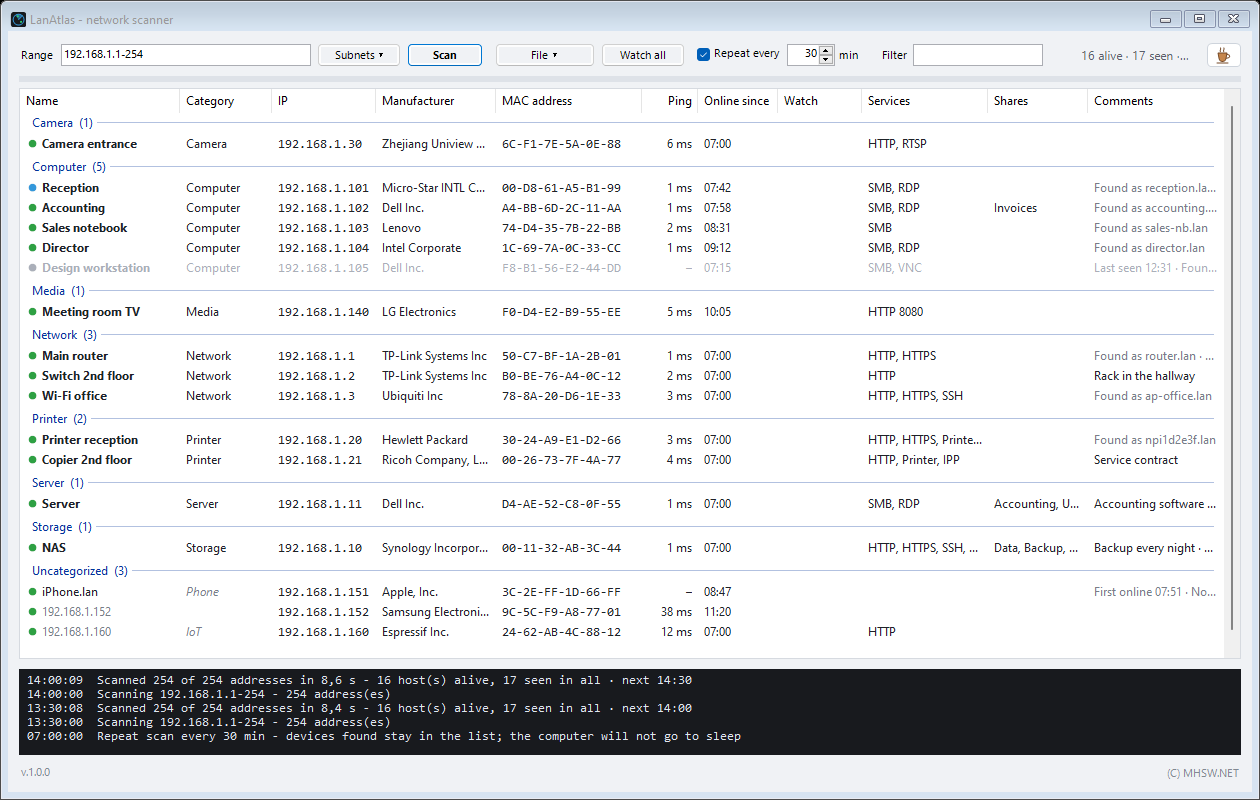
 Enlarge
What it does
Enter an address range, or let the program take it from the network card, and LanAtlas goes through every address at once. A home network or an ordinary office (254 addresses) is done in about fifteen seconds. Every device that answers shows up in the list with everything it gave away about itself.
A bare list of IP addresses tells nobody anything a week later, though. So in LanAtlas you write down what each device is: “Reception printer”, “Backup NAS”, “Gate camera”. You put it in a category and add a note. The description is saved to a file and after the next scan it finds its device again on its own, even when the device has meanwhile got a different IP address.
- At home: find out at last what is on your Wi-Fi. The TV, the robot vacuum, smart plugs, the kids' phones, and the device that should not be there.
- At work: a network inventory without walking round the offices. Which computers, printers, cameras and servers there are, what is shared where, and what runs at which address.
- On a service call: find the customer's printer, NAS or router fast, open its web interface, and leave them a report describing their network.
It is one LanAtlas.exe: no installer, no administrator rights, and it fits on a USB drive next to your other service tools.
It complements the other MHSW network tools: LanAtlas shows what is on the network, LanAuditPro checks whether it is safe (device services, outdated firmware, known vulnerabilities), and LANtester measures whether the link to a NAS or server holds up under full load.
What’s new · v1.0.0
- Scans an address range or the whole subnet of a network card, a /24 in a few seconds
- Finds computers that do not answer ping, too (ARP request on the local subnet)
- Name from DNS, NetBIOS, mDNS (Bonjour) or the title of the device's web page, manufacturer from the MAC address (built-in IEEE registry)
- Watch chosen devices, or all found devices with one button: a message pops up when one goes down, the watched addresses are remembered
- Describe the network: name the devices, sort them into categories and add notes, the list and the report are grouped by category; everything is saved as a .lanatlas file and opens again with the switched-off devices too
- Online since column: the time the device came online. With a repeated scan it shows what was switched on during the day, and when; sorting by it shows the order
- Repeated scan every chosen number of minutes: left running for a day, the program collects every device in the office, even those switched on only for a while; the ones switched off stay in the list with the time they were last seen
- Suggested category: from the ports, manufacturer, name and web page the program tells a printer from a computer, camera, router, NAS, phone…; one click accepts the suggestion
- Knocks on a device's services one at a time and spaced out, not all at once, so the network protection of an antivirus (ESET, for one) does not take the scan for a port scan attack; this computer is not knocked on at all, its services come from Windows
- Detects web, FTP, SSH, Windows shares, Remote Desktop, Radmin, VNC and printers; lists the shared folders
- Opens a shared folder, web page or Remote Desktop from the context menu, runs ping, tracert or Wake-on-LAN
- Saves the result as an HTML report or as CSV for Excel
How it finds the devices that are on
LanAtlas sends every address two requests at the same time. It is enough for the device to answer one of them:
- Ping. The classic “are you there?” with a one-second limit. The round trip in milliseconds shows in the Ping column. But the Windows firewall and many phones and cameras drop ping.
- ARP. The request “who has this address, send me your MAC”. On its own subnet every device that is switched on has to answer it, or it could not talk at all, and no firewall can block it. That is why LanAtlas finds computers that keep quiet to ping. Their Comments say “No ping (ARP only)”.
For the addresses that answered it then finds the details: the name, the network card's manufacturer, open services and shared folders. Meanwhile the row is amber and turns green when done. A running scan shows as a progress line under the toolbar, a spinning wheel and the percentage in the window title, which you see on the taskbar even when the window is behind others.
What the list shows
| Column | What it means |
|---|---|
| Name | Your own name for the device, in bold. Otherwise the name the device gave: from DNS, from NetBIOS (Windows computer names), from mDNS (Bonjour, used by Apple, printers and smart-home gear), or as a last resort the title of its web page. |
| Category | The category you chose. Until it has one, the program's suggestion shows here in grey italics (see below). |
| IP, MAC address | The address and the MAC address of the network card. |
| Manufacturer | The manufacturer from the MAC address, looked up in the IEEE registry built into the program. Works without internet. |
| Ping | The round trip in milliseconds, “–” for a device that does not answer ping. |
| Online since | The time the device came online. With a repeated scan it shows what was switched on during the day, and when. |
| Watch | The watch status: a watched device that has gone down turns red here. |
| Services | Open services: web (HTTP, HTTPS, 8080), FTP, SSH, Windows sharing (SMB), Remote Desktop (RDP), Radmin, VNC, printer (9100, IPP) and camera (RTSP). |
| Shares | The shared folders and printers a computer or NAS offers. |
| Comments | Your note and everything else: gateway, this computer, workgroup, signed-in user, the name found on the network, “Last seen 12:31” for devices switched off. |
The dot before the name: green answered, amber still being probed, blue this computer, grey no answer this time. The Filter box narrows the list by anything in the row (name, IP, manufacturer, service), and a click on a column header sorts by it.
Describing the network, at home or at work
This is what sets LanAtlas apart from ordinary IP scanners. The result of a scan does not end as a one-off listing; it becomes documentation of the network that you come back to.
- Name, category, note. With F2 or a right click you name the device, file it (Network, Server, Computer, Printer, Storage, Camera, Phone, Media, IoT or a category of your own) and add a note, say “service contract until 2027” or “rack in the hallway”. A category can be set on several devices at once.
- Grouped by category. The list and the report split into groups, so you see all the printers, all the cameras and all the computers at a glance. Ctrl+G turns the groups off.
- The MAC address holds the description. The router gives the laptop another IP tomorrow, and the name and category move to the new address with it. Devices on another subnet, where the MAC cannot be read, go by their address.
- The .lanatlas file. Ctrl+S saves the description of the network and the last state of the scan. Once opened, it shows the devices that are not switched on right now too, in grey with the date they were last seen. The file is plain tab-separated text that Notepad and Excel both read, and a double-click on it opens LanAtlas. You can keep a file for every network you look after: at home, at the office, at customers'.
A suggestion of what the device is
Until a device has a category, LanAtlas tries to guess what it is. It weighs the open ports (9100 and IPP give away a printer, RTSP a camera, Remote Desktop and file sharing a computer), the network card's manufacturer, the DNS, NetBIOS and mDNS names and the title of the web page. The suggestion shows in grey italics in the Category column, and only when the program is sure enough. Hover over the row for why it thinks so. A right click and Accept suggested category confirms it, on several rows at once if you like. Describing a network of dozens of devices then takes a few minutes.
A day-long record: what came online, and when
A single scan only catches what is switched on at that moment. The sales rep's laptop that arrives at ten, or a phone that joins for a few minutes, would slip past. That is why LanAtlas has the Repeat every [30] min option:
- Ticking it starts a scan right away and repeats it after the chosen number of minutes (1 to 1440).
- Devices are only added, nothing disappears. Whatever has been switched off since stays in the list in grey, marked “Last seen 12:31”.
- The Online since column shows at what time each device came online. Sorted by it, you see how the network filled up during the day. A device that dropped off and came back gets the new time, and the first one is in Comments as “First online 07:51”.
- The status line keeps showing something like “16 alive · 17 seen · next 14:30”: how many devices are online now, how many were found in all, and when the next round runs.
- A laptop or phone that gets a different IP address during the day stays in the list once. It is recognised by its MAC address.
- While the option is on, the computer does not go to sleep. The screen may switch off.
Leave LanAtlas running from morning to evening, save the result (Ctrl+S) and you have a list of every device that showed up on the network that day, including the ones that were on only for a while.
Watching for outages
A right click and Watch (or Ctrl+W) makes LanAtlas watch the selected device. The Watch all button in the toolbar watches every device found at once. Every five seconds it asks them whether they are alive. When one fails to answer three times in a row, it turns red in the Watch column and a message pops up. Handy for a server, NAS, camera or printer that “drops out now and then”. The program remembers the watched addresses and carries on watching after the next start.
What you can do with a device right away
- A double-click opens the most useful thing: the shared folders, otherwise the web interface, otherwise Remote Desktop.
- Right click: open a shared folder or the whole computer in Explorer, the web (HTTP, HTTPS, 8080), FTP, Remote Desktop, SSH in a console, run a continuous ping or tracert.
- Wake-on-LAN wakes a computer that is switched off, several selected ones at once too.
- Rescan checks just the selected devices again. Whoever does not answer goes grey and stays in the list.
- Copy copies the IP, name, MAC or whole rows separated by tabs, ready for Excel.
Report and export
- Ctrl+R saves a self-contained HTML file: the devices grouped by category, their services, shares and notes, and separately the described devices that did not answer. It opens without internet and reads well in light and dark mode. A good handout for a customer or for the company documentation.
- The same command also makes CSV for Excel. The separator follows the Windows settings, so Excel splits the file into columns correctly in any language.
- A report can be made from an opened .lanatlas file too, without a new scan.
Good to know
Scan only networks that are yours or that someone has entrusted to you. LanAtlas breaks into nothing: it only asks the devices what they normally tell anyone on the network. On someone else's network, though, even that may not be welcome.
An antivirus with network protection (ESET, for one) on a scanned computer watches for anyone trying many of its ports at once. That is why LanAtlas knocks on each device's services one at a time and spaced out, and does not knock on its own computer at all. Should an antivirus still report the scan as an attack from your computer's address, it is this scan, not an intrusion.
Phones on Wi-Fi in power saving often do not answer even ARP. That is why they come and go in a repeated scan and can raise false outages when watched.
Behind a router (another subnet, a VPN) only ping is left. A device that drops ping cannot be found there, and neither its MAC address nor its manufacturer can be read. Scanning from a computer on that subnet helps.
Keys
| Key | What it does |
|---|---|
F5 | Starts a scan, or stops a running one. |
Esc | Stops the scan. |
Enter | Opens the selected device, like a double-click. |
F2 | Name, category and note of the selected devices. |
Ctrl+W | Watches the selected devices, or stops watching them. |
Ctrl+C | Copies the selected rows. |
Ctrl+A | Selects all rows. |
Ctrl+F | Jumps to the filter. |
Ctrl+O / Ctrl+S | Opens / saves the .lanatlas file (Ctrl+Shift+S under another name). |
Ctrl+R | Saves the HTML or CSV report. |
Ctrl+G | Groups the list by category, or ungroups it. |
F1 | Short help. |
Update check
When it starts, LanAtlas asks www.mhsw.net once whether a newer version exists. The request carries only the program name, its version and the Windows build number, nothing about you, your network or the devices found. The server keeps a count of these checks, not of who made them. Nothing is downloaded or installed: a newer version only shows up in the bottom left corner as a link to this page. A box in the help (F1) turns it off, and then nothing is sent.
Requirements
- Windows 10 or Windows 11.
- .NET Framework 4.8. Windows 10 (since 1903) and Windows 11 already have it.
- No administrator rights needed.
- A computer connected to the network you want to explore, by cable or over Wi-Fi.
Related programs
LanAtlas shows what is on the network. Whether it is safe is for LanAuditPro to say: it checks the services of every device and lists the risks with what to do about them. To find out whether the link to one of those devices holds up under full load, point LANtester at it: it plots throughput and ping live. MHWiFiPass pulls the Wi-Fi password for a new device out of Windows. And for the printers installed in Windows, PrinterAdmin shows which answer and which do not.

A security audit of your home or office network
Goes through the network the way a technician would: finds every device, tells the router, camera, NAS and smart home apart, checks their services and lists the risks worst first, with what to do. On top, a grade from A to F and a lookup in the NVD vulnerability database.

Network adapter stress test with live charts
Continuously reads data from an SMB/UNC share, pings the peer at the same time and plots both metrics as live charts. It exposes dropouts, throughput collapses and latency spikes under sustained full load.

Saved Wi-Fi passwords, with a QR code each
Every Wi-Fi network saved in Windows, with its password, in one list. Copies the password with one click and shows a QR code the phone joins with, no retyping.

A printer list you can actually search
Every installed printer in one list with manufacturer, model, address and, above all, whether the printer answers at all. Search, sorting and filters by manufacturer, state and connection type.