

 Enlarge
What it does
A home or a small office network carries far more than computers these days: the provider's router, cameras, a NAS with the backups, a printer, a TV, smart plugs and sensors, Home Assistant. Each of these devices runs its own software that hardly anyone updates, and its own services that hardly anyone knows about. LanAuditPro goes through all of them and tells you where the problem is.
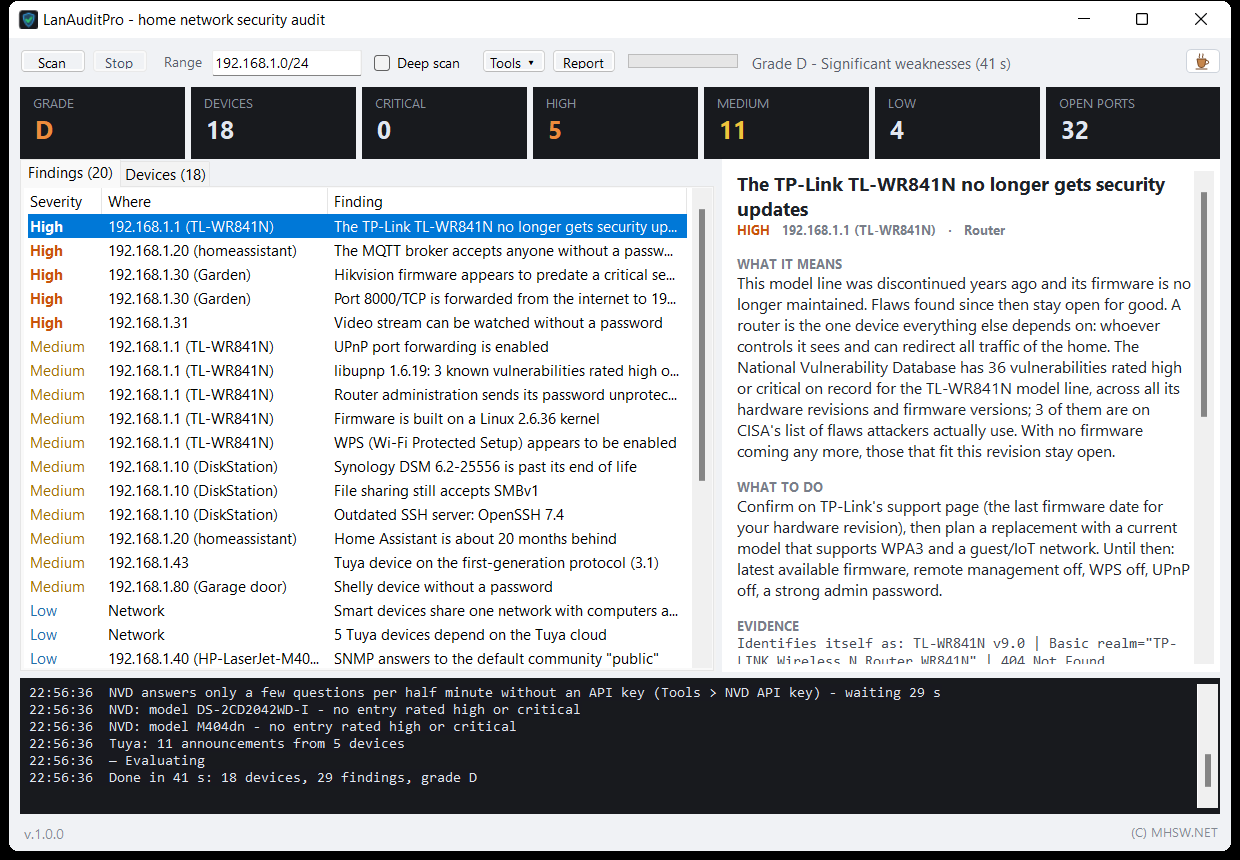
Press Scan and the program checks the computer's whole subnet. A home network with a few dozen devices takes about a minute. The result is not a list of ports but a list of findings in plain words: “The camera's video can be watched without a password”, “The router no longer gets security updates”, “UPnP lets any device open a port to the internet”. Each finding comes with an explanation, a concrete piece of advice and the evidence it rests on.
- At home: find out whether the garden camera streams its picture to anyone on the network, whether the router is ten years old and whether the smart home has a back door open.
- In a small office: a quick check of what runs on the network and what is outdated: a NAS past end of support, Telnet on a switch, file sharing over the obsolete SMBv1, a database reachable from the whole network.
- On a service call: run the audit at the customer's, have a grade and a to-do list a minute later, and leave them an HTML report.
It is one LanAuditPro.exe of about 1 MB. No installer, no administrator rights, and nothing needed beside it.
It complements the other MHSW network tools: LanAtlas documents the network (you name and file every device and see what came online during the day), LanAuditPro tells you how safe it is, and LANtester measures whether the link to a NAS or server holds up under full load.
What’s new · v1.0.3
- In-depth analysis of one device: ten pings with TTL and response spread (operating system, and a battery device on Wi-Fi), factory or random MAC, IPv6 addresses, names from mDNS, DNS and NetBIOS, and the services the device announces
- Asks whether it is a Xiaomi smart-home device (miIO), Tuya, Chromecast / Android TV, AirPlay, UPnP or SNMP, and reads from the answers and the silences whether it is more likely a phone or a smart-home gadget
- Says where to look next: the router's DHCP client list and where a phone shows its MAC; the result can be copied as text
- Lists sort by a click on a column heading, a second click reverses the order; addresses, port counts and severities sort as numbers
Earlier versions (3)
v1.0.2 · 13 November 2026LanAuditPro 1.0.2: Matter, Thread, KNX, Modbus and smart-home controllers
The audit now also checks the smart home and building technology it used to only recognise: Matter and HomeKit devices waiting to be paired, Thread, KNX interfaces, BACnet, Modbus on solar inverters, wallboxes and heat pumps, and controllers left open without a login. It still never tries a password and changes nothing on any device.
- Matter: a device in pairing mode that anyone with the code from its sticker can add, and an overview of Matter devices with the number of controllers (fabrics)
- HomeKit: accessories nobody has paired yet
- Thread: the border routers and the Thread network the devices hide behind
- A KNX IP interface reachable from the whole network, taking KNX IP Secure into account
- BACnet building control and Modbus TCP on inverters, wallboxes and heat pumps; Modbus is only asked what the device is, nothing is written
- Controllers without a login: ioBroker, openHAB, Domoticz, Homebridge, Z-Wave JS UI, Pi-hole; Homebridge with its setup unfinished
- A Tuya device whose MAC belongs to another maker is shown as a Tuya product, with that maker named as the network chip
v1.0.1 · 13 November 2026LanAuditPro 1.0.1: over 30 new device checks
The audit now finds unfinished first-run setups, weak certificates and ciphers, abandoned web servers inside devices, a spoofed router and what changed in the network since the previous audit. It still never tries a password and changes nothing on any device.
- First-run setups left unfinished, where anyone can create the admin account: Home Assistant, Nextcloud, Portainer, Jellyfin, Emby, Synology
- Encryption: HTTPS certificates (weak key, SHA-1 signature, one factory key on several devices), SSH ciphers and the Terrapin attack, login pages without HTTPS
- Abandoned web servers inside devices (Boa, GoAhead 2, uc-httpd, RomPager with the Misfortune Cookie flaw) and an outdated dnsmasq DNS server in the router
- Printers: model and firmware over IPP, and for Brother a warning about the derivable factory password
- SMB shared folders open without a password, a camera's still picture without a password, the version of an open MQTT broker
- Network: a changed router hardware address and another device with its address (ARP spoofing), an unusual DNS or DHCP server, public IPv6, two IPv6 routers; from a laptop on Wi-Fi also WPS, an open network with the same name and PMF protection
- NVD lookups now also for dnsmasq, Mosquitto, QNAP QTS, Jellyfin, Grafana, Nextcloud, Portainer and Plex
- Comparison with the previous audit: ports that opened, what went away since, and the previous grade
- When the NVD database refuses or does not answer, the audit says so in the findings and the report, with a link to a free API key
- A clearer window: prominent Findings and All devices tabs, and under each list a button to the other
- Fix: the reply to a second question on the same connection (SSH ciphers, FTP, RTSP) is no longer lost
v1.0.0 · 13 November 2026New app LanAuditPro: a security audit of your home or office network
LanAuditPro goes through the network the way a technician would: it finds every device, tells the router, camera, NAS, printer, Home Assistant and Tuya smart home apart, checks their services and lists the risks worst first, each with an explanation and what to do about it. On top comes a grade from A to F, and it asks the NVD vulnerability database about the software and models it found. It never tries a password and changes nothing on any device.
- Finds devices by ping and ARP, plus those that only speak up in network announcements (battery-powered Tuya sensors)
- Works out what each device is from service banners, its web page, UPnP, mDNS, ONVIF, SNMP and the manufacturer behind the MAC address; for many it finds the model and firmware
- Checks about 100 ports that matter on each device, the deep scan every port from 1 to 1024
- Asks each service only the question its own protocol offers: may I come in without a password? MQTT, RTSP video, VNC, FTP, SMB shared folders, SMBv1, Redis, ADB, the Docker API, a camera's still picture
- About 100 rules: Wi-Fi without encryption or with WEP, UPnP and port forwards, retired routers, WPS, Telnet, old SSH and UPnP libraries with known holes, Hikvision cameras on old firmware, Synology DSM past end of life, WD My Cloud, QNAP, Node-RED, ESPHome, Zigbee2MQTT and more left open
- First-run setups left unfinished, where anyone can create the admin account: Home Assistant, Nextcloud, Portainer, Jellyfin, Emby, Synology
- Encryption: HTTPS certificates (weak key, SHA-1 signature, one factory key on several devices), SSH ciphers and the Terrapin attack, login pages without HTTPS
- Abandoned web servers inside devices (Boa, GoAhead 2, uc-httpd, RomPager with the Misfortune Cookie flaw) and an outdated dnsmasq DNS server in the router
- Printers: model and firmware over IPP, and for Brother a warning about the derivable factory password
- Network: a changed router hardware address and another device with its address (ARP spoofing), an unusual DNS or DHCP server, public IPv6, two IPv6 routers; from a laptop on Wi-Fi also WPS, an open network with the same name and PMF protection
- Smart home: the Tuya protocol version read from each device's announcement (3.1 to 3.5), Home Assistant found on its own, with a token also its pending updates
- Asks the National Vulnerability Database by the exact software version (SSH, UPnP, web and FTP server, dnsmasq, Mosquitto, Synology DSM, QNAP QTS, Home Assistant, Jellyfin, Grafana, Nextcloud, Portainer, Plex) and by the model number of routers, cameras, printers and TVs; marks the flaws CISA lists as actually exploited. Only product names, models and versions are sent, and it can be switched off
- Grade A to F, findings worst first, each with what it means, what to do and the evidence it rests on; a separate list of what looks fine
- Comparison with the previous audit: new devices, ports that opened, what went away since, and the previous grade
- The report as one HTML file that opens offline, JSON export, findings as text to the clipboard
- Without a window for a scheduled task: LanAuditPro.exe /report C:\audit.html
How the audit runs
- Finding devices. Ping and ARP to every address in the range. Every device that is switched on has to answer ARP on its own subnet, so computers behind a firewall turn up too. Meanwhile the program listens for Tuya announcements the whole time, which finds the battery-powered sensors that answer nothing else.
- Identification. Names from DNS, NetBIOS and mDNS, UPnP and ONVIF announcements, SNMP, service banners, web page titles and headers, and the manufacturer behind the MAC address from the IEEE registry built into the program. From that LanAuditPro tells the device type, and often the model and firmware version.
- Ports and services. About 100 ports per device where the things that matter run (web, SSH, Telnet, file sharing, remote desktop, cameras, smart home, databases). The Deep scan tries every port from 1 to 1024. Of the services that allow it, it asks a single question: will you let me in without a password?
- Questions by device family. Home Assistant, Hikvision and ONVIF cameras, Chromecast, Shelly, Philips Hue, Docker, QNAP, printers (IPP) and web applications such as Nextcloud, Portainer, Jellyfin or Grafana get extra questions that give away their version and settings - and above all whether someone left the first-run setup unfinished, where anyone can create the admin account.
- Encryption. For every HTTPS port the program reads the certificate (weak key, SHA-1 signature, one factory key on several devices), for SSH the ciphers on offer and whether it resists the Terrapin attack, and it points out login pages without HTTPS.
- Changes since last time. The program remembers the last audit: it shows ports that opened, new devices, what went away, the previous grade, and a change of the router's hardware address that can give away an impostor.
- Vulnerability database. The software found with an exact version and the devices' model numbers are checked against the National Vulnerability Database (see below).
- Evaluation. About 100 fixed rules, a grade and a list of what looks fine.
Progress is visible all along: the bar moves with every probe, the status line shows the counts and an estimate of the time left, and the log at the bottom prints every open port the moment it is found. Connections are opened sparingly (five at a time per device), because small ESP modules and older cameras stop answering under a heavier load.
What it checks
| Area | Example findings |
|---|---|
| Network | Wi-Fi without encryption, with WEP or the old WPA/TKIP, Windows Firewall off, UPnP and every port forward to the internet, double NAT, smart devices on the same network as computers and NAS, devices that cannot be identified, and devices new since the last audit. |
| Router | A model its maker no longer writes firmware for, a Linux 2.6 kernel, administration over plain HTTP with the password in the clear, WPS on, USB file sharing, TR-069, Winbox. |
| Services | Telnet, FTP (anonymous too), outdated SSH, SMBv1, NFS, AFP, rsync, Remote Desktop, VNC (without a password too), MQTT without a password, Redis, Android debugging (ADB), the Docker API, databases, PPTP, SNMP “public”, old TLS only, UPnP libraries with known holes. |
| Web apps | Node-RED, the ESPHome dashboard, Zigbee2MQTT, Frigate, go2rtc, Tasmota, WLED and others that open without a login. |
| Cameras | RTSP video without a password, a Hikvision camera never activated, Hikvision firmware older than the fix of a critical 2021 flaw, Dahua, XMEye, ONVIF without a login. |
| Storage | Synology DSM 6 past end of support, older DSM 7 branches, WD My Cloud OS 3, QNAP. |
| Smart home | Tuya by protocol version and the dependency on the Tuya cloud, Home Assistant (version age, pending updates, access from the internet), Shelly without a password, ESPHome without encryption, TP-Link Kasa, LG TVs on webOS. |
| Matter, HomeKit, Thread | Matter devices in pairing mode that anyone with the code from the sticker can add, unpaired HomeKit accessories, Thread border routers, an overview of Matter devices and how many controllers (fabrics) they belong to. |
| Smart-home controllers | ioBroker, openHAB, Domoticz, Homebridge, Z-Wave JS UI and Pi-hole without a login. |
| Building and energy | A KNX IP interface reachable from the whole network (taking KNX IP Secure into account), BACnet building control, Modbus TCP on solar inverters, wallboxes and heat pumps. Devices are only asked what they are; nothing is written. |
Each rule claims only what the program actually measured. Where a conclusion is inferred (say the age of a camera's firmware from the date of its web interface files, because the camera shows the version only after a login), the finding says so and tells you how to check it.
The NVD vulnerability database
Fixed rules know what was known on the day the program was released. For the audit to know what is known today, LanAuditPro asks the US National Vulnerability Database (NIST). It asks two ways:
- By software version. Where a device gives away the exact version (OpenSSH, Dropbear, UPnP libraries, the nginx, Apache, lighttpd and RomPager web servers, FTP servers, the dnsmasq DNS server, the Mosquitto MQTT broker, Synology DSM, QNAP QTS, Home Assistant, Jellyfin, Grafana, Nextcloud, Portainer, Plex), the database returns the flaws of exactly that version.
- By device model. For routers, cameras, printers and TVs with a model number it returns everything on record for the model line. Whether a flaw is open on your unit depends on its firmware, and the finding says just that.
The result takes flaws with a CVSS score of 7 and above. Those CISA lists as actually exploited by attackers are marked EXPLOITED and come first. A match by version number is not yet a hole, because vendors often fix without changing the version. That is why a database finding never gets above Medium on its own. Where a hand-written rule already speaks about the same software (say “outdated SSH”), the list of flaws is attached to it rather than making a second finding.
What leaves the computer: only product names, model numbers and versions. No addresses, no device names, nothing about your network. Answers are kept on the computer for a week. Without an API key the database answers only five questions per half minute, so a first audit waits a little. A free key can be entered in Tools, where the lookup can also be switched off altogether. The audit then runs the same, only without the CVE lists.
This product uses the NVD API but is not endorsed or certified by the NVD.
The smart home
- Tuya / Smart Life. Tuya devices (and the hundreds of brands built on them) announce themselves on the network. LanAuditPro reads the protocol version from those announcements: 3.1 is the first generation with unencrypted answers, 3.3 encrypts with a fixed key, 3.4 and 3.5 negotiate a key for every connection. It also explains what the dependency on the Tuya cloud means and how to secure the app account. If Windows Firewall drops the announcements, Tools > Allow Tuya discovery adds one rule for this program and the local network only; Windows asks for administrator rights.
- Home Assistant is found on its own and the program shows how old its version is. With a long-lived token (Tools) it also reads the pending updates and integrations. It only reads, and sends the token to your Home Assistant and nowhere else. It stores it only when you explicitly ask, encrypted for your Windows account.
- Shelly, ESPHome, Tasmota, Zigbee2MQTT, MQTT and others: whether they want a password and whether their traffic is open to anyone on the network.
The grade and the findings
Findings have five levels: Critical, High, Medium, Low and Info. “High” means that anyone on the network, or one compromised device, gets control of another device or its data without a password. The network starts at 100 points and every finding takes some off by its severity. Each level can only take so much, though, so that twenty small notes never weigh more than one camera anybody can get into. The grade also has a ceiling: one high finding means C at best, a critical one D at best, two critical ones F.
The Findings tab sorts the findings worst first. Select one and the right side shows what it means, what to do and what it rests on: a service banner, the device's answer or entries from the NVD database. The Devices tab shows every device with its ports and everything it said about itself, and a double-click opens its web page. A device the network did not have at the previous audit carries a new mark.
Report and running without a window
- Report (Ctrl+R) saves the whole audit as one HTML file: the grade, the findings with advice and evidence, the device list, what looks fine and what needs checking by hand. It opens without internet and reads well in light and dark mode.
- Tools copies the findings to the clipboard as text or exports them as JSON (Ctrl+J), for other tools or for a second opinion.
- Without a window, for a scheduled task:
LanAuditPro.exe /report C:\audits\home.html [range] [/deep]writes the report, the JSON and a log.
Good to know
Audit only networks that are yours or that you may test. LanAuditPro breaks into nothing and tries no password, not even a default one. It only asks what the protocol itself offers (“will you let me in without a password?”) and changes nothing on any device. A port scan may still not be welcome on someone else's network.
An antivirus with network protection on the computers being checked may report the port scan as an attack from your computer's address. It is this audit, not an intrusion.
The program sees the network from the inside. It cannot tell how strong your passwords are, whether your cloud accounts have two-step verification, or what has been forwarded by hand on the router (it only sees forwards made through UPnP). That is why the report ends with a short list of things to check by hand. IPv6 is not audited yet.
Wi-Fi encryption can only be read from a computer connected over Wi-Fi. On a cable the audit says so and tells you where to check it.
Keys
| Key | What it does |
|---|---|
F5 | Starts the audit. |
Esc | Stops a running audit. What was found so far is still evaluated. |
Ctrl+R | Saves the HTML report. |
Ctrl+J | Exports JSON. |
F1 | Help. |
Privacy and the update check
The results stay on the computer. The only things that leave your network are the NVD lookup described above, a few pings towards 1.1.1.1 that show whether a second router sits behind yours, and the update check.
When it starts, LanAuditPro asks www.mhsw.net once whether a newer version exists. The request carries only the program name, its version and the Windows build number, nothing about you, your network or the devices found. The server keeps a count of these checks, not of who made them. Nothing is downloaded or installed: a newer version only shows up in the bottom left corner as a link to this page. A box in the help (F1) turns it off, and then nothing is sent.
Requirements
- Windows 10 or Windows 11.
- .NET Framework 4.8. Windows 10 (since 1903) and Windows 11 already have it.
- No administrator rights needed. Windows asks for them only when adding the firewall rule for Tuya devices.
- A computer connected to the network you want to check, by cable or over Wi-Fi.
Related programs
LanAuditPro judges how safe the network is. The security of the computer itself (Defender, firewall, UAC, BitLocker, Remote Desktop) is for PCHealthLab to check. From a computer on a cable the audit cannot see the Wi-Fi encryption; how the networks saved in Windows are encrypted, MHWiFiPass shows. When you mainly want to document the network, naming and filing every device and seeing what came online during the day, reach for LanAtlas. And whether the link to a NAS or server holds up under full load without dropouts, LANtester measures in live charts.

A network scanner that turns the result into a map
Finds every device on the network with its name, MAC address, manufacturer, services and shared folders. Name the devices and sort them into categories, and one scan becomes a description of the whole home or office network.

Network adapter stress test with live charts
Continuously reads data from an SMB/UNC share, pings the peer at the same time and plots both metrics as live charts. It exposes dropouts, throughput collapses and latency spikes under sustained full load.

Hardware and Windows diagnostics with repairs
Checks the battery, disks, CPU and GPU under load with temperatures, RAM, system integrity and security. Sorts the findings by severity and offers a one-click repair for many of them.
Saved Wi-Fi passwords, with a QR code each
Every Wi-Fi network saved in Windows, with its password, in one list. Copies the password with one click and shows a QR code the phone joins with, no retyping.