

 Enlarge
What it is for
A customer brings a laptop where "the E key sometimes doesn't work", or a mouse that "double-clicks by itself". You can type the alphabet into Notepad, but the Win key, the volume keys, Print Screen or the right Alt never show up there, and nobody spots a double press a few milliseconds apart by eye.
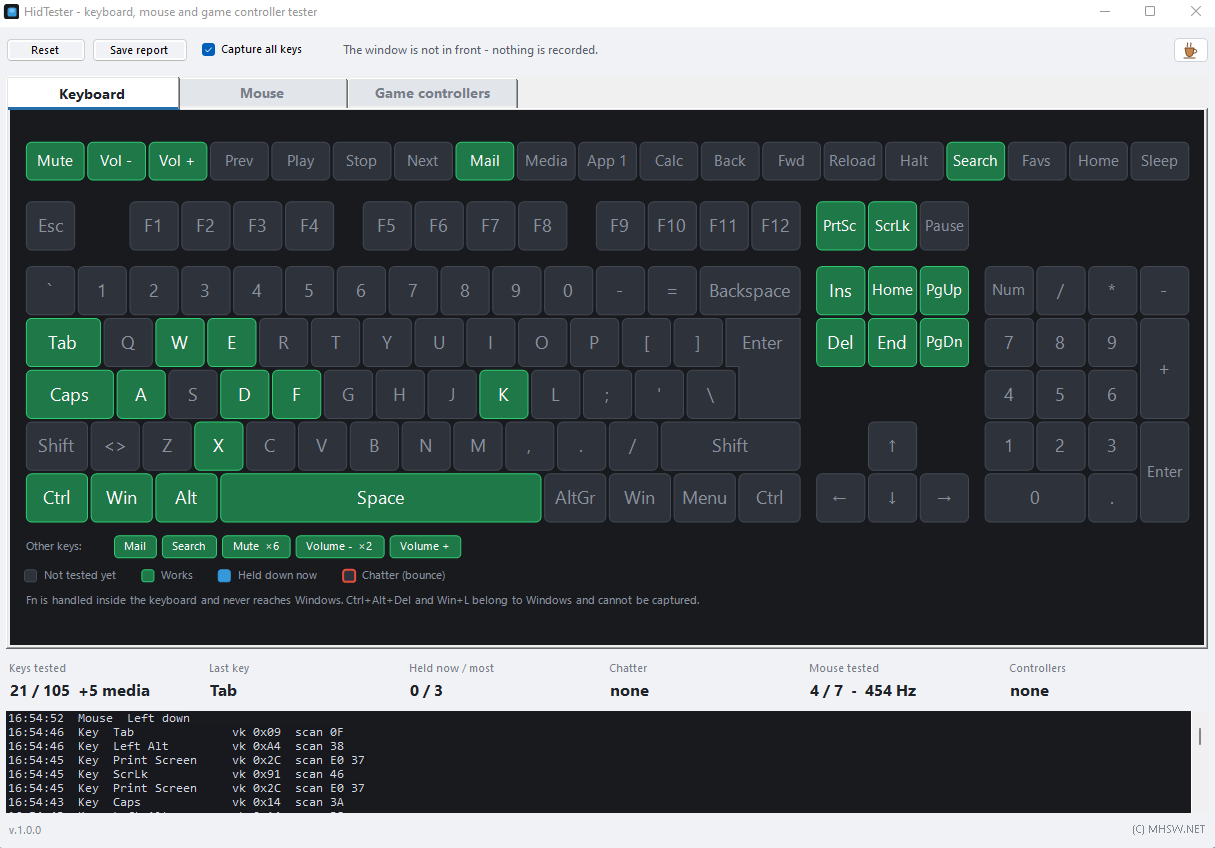
HidTester shows the whole keyboard as a picture. A key lights blue while you hold it and turns green after its first press, so you see at once what is left to try. It tests the mouse and game controllers – gamepads, joysticks and wheels – just as clearly, and finally saves a report you can attach to the job.
Try it online first
Rather not download anything? A browser handles most of the tests too: the online keyboard tester (every key, rollover, chatter), the online mouse tester (buttons, double click, polling rate, DPI) and the online gamepad tester (buttons, triggers, stick drift, rumble). The Win key, volume without full screen, the Guide button and controller battery stay out of a web page's reach, though – that is what this program is for.
Keyboard tester: really every key
Keys are read before Windows acts on them. That is how the program catches the ones ordinary windows never receive:
- Win (left and right), Menu, Print Screen, Scroll Lock, Pause and Num Lock;
- volume, mute, play, next and previous track, mail, calculator and the browser keys;
- left and right Shift, Ctrl and Alt separately, with AltGr correctly as the right Alt;
- the numeric keypad including its Enter;
- F13–F24, vendor keys and controls the keyboard sends only as HID (brightness, say) are listed under the picture.
With Capture all keys ticked, every key goes to the test only: Win does not open the Start menu, Alt+Tab does not switch windows and the volume stays put. To type normally, switch to another tab.
Keys are recognised by their physical position, not by the character, so the keyboard layout does not matter – a Czech QWERTZ and a US layout test the same.
Ghosting, rollover and chatter
The Held now / most tile shows how many keys are down at once – hold several together and you see how many the keyboard handles (rollover) and which combinations get lost (ghosting). When a key fires again within 30 ms of being released, the program frames it red: that is chatter, a worn or dirty switch that types letters twice.
What no program can see: the Fn key is handled inside the keyboard and never reaches Windows. Ctrl+Alt+Del and Win+L are taken by Windows before any application, and the Power and Sleep keys may put the computer to sleep even during the test.
Mouse tester
- left, right and middle button, the Back and Forward side buttons;
- the wheel up and down and its tilt to the sides;
- the real report rate in Hz – typically 125, 500 or 1000 Hz;
- raw, unaccelerated movement drawn on a pad;
- button chatter – the well-known "mouse double-clicks by itself" fault: a second click within 30 ms of the release.
Each button shows its press count, the length of the last press and the shortest gap between a release and the next press.
Gamepad and joystick tester
Game controllers are read two ways, so the program handles gamepads, joysticks and wheels:
- Xbox and compatible gamepads (XInput): both sticks, both triggers separately, every button including the Xbox button, the d-pad, a test of the left and right rumble motor and the battery level;
- joysticks, wheels and other gamepads (the Windows game controller driver): up to 6 axes, 32 buttons and the hat (POV).
Axis calibration and diagnostics
Before you calibrate a controller you need to know what is wrong with it. For every axis and stick, HidTester measures:
- range – whether the axis reaches both ends; green markers appear once it does;
- noise – how much the value wobbles while you do not touch the controller;
- stick circularity – rotate the stick slowly along its edge and the program works out by how many percent the outline differs from a circle;
- drift – how far from the centre the stick stays at rest, compared with the recommended dead zone.
The calibration itself is stored by Windows: the Windows calibration… button opens Game Controllers (joy.cpl), where a joystick or wheel is calibrated, and HidTester shows the result straight away. Xbox controllers have no calibration in Windows – for them the measurement tells you whether a stick needs cleaning or replacing.
The customer report
Save report writes a single self-contained HTML file – no external files, no internet needed. It contains:
- an overall verdict – no faults, or how many chatter events there were;
- a keyboard map with the working, untried and faulty keys and a list of the keys that were not tried;
- the mouse results: buttons, wheel, report rate and chatter;
- for each controller the axis range reached, the stick circularity and the buttons not tried;
- the log of all events.
The page follows the reader's light or dark theme and is laid out to print.
Privacy: nothing is recorded outside its window
To see the Win key or the volume keys, the program has to read keys at a low level of Windows. It records them only while its own window is in front, though – what you type in other programs it does not see and does not store. Key presses are sent nowhere; they stay in the window and in the report, if you save one.
When it starts, HidTester asks www.mhsw.net once whether a newer version exists. The request carries only the program name, its version and the Windows build number, nothing about you, your files or your computer. The server keeps a count of these checks, not of who made them. Nothing is downloaded or installed: a newer version only shows up in the bottom left corner as a link to this page. A box in the help (F1) turns it off, and then nothing is sent.
Requirements
- Windows 10 or Windows 11 (64-bit).
- .NET Framework 4.8 — part of Windows 10 since version 1903 and of Windows 11, so there is nothing to install.
- No installer and no administrator rights: one file of about 200 kB.
- USB, Bluetooth, wireless and PS/2 keyboards and mice; Xbox and compatible controllers, other gamepads, joysticks and wheels with a Windows driver.
Guides for this program
Real problems this program solves, step by step.
- My mouse double-clicks by itself. How do I check it?
- Some keys do not work or type twice. How do I test my keyboard?
- How do I check stick drift on an Xbox or PlayStation controller?
- How do I measure my mouse polling rate and DPI?
- How many keys can my keyboard handle at once? Testing ghosting and N-key rollover
Related programs
HidTester checks what you control the computer with. For the rest of the hardware – disks, processor and graphics under load, memory and temperatures – use PCHealthLab.

Hardware and Windows diagnostics with repairs
Checks the battery, disks, CPU and GPU under load with temperatures, RAM, system integrity and security. Sorts the findings by severity and offers a one-click repair for many of them.